

How to Organize Daily Tasks: Simple Systems That Work
Quick Summary
To organize daily tasks effectively, use a simple three-step system that takes about five minutes: capture everything in one place, decide what actually needs to happen today, and schedule those tasks into real time slots on your calendar. A list without decisions becomes a guilt archive.
- Keep fixed deadlines and flexible tasks on separate lists so important items never get buried.
- Break big projects into small steps you can finish in one sitting. Only put the first step on today’s list.
- Run three short planning moments daily: a morning plan, a mid-day review, and an end-of-day reset. None should take more than ten minutes.
- Add 25 to 50% to your first time estimate, then adjust after a week of tracking.
- Leave one open block of 30 to 60 minutes each day for unexpected tasks.
- Remove repeating chores completely. Tools like an automatic pet feeder or a space-saving trash can can take tasks off your list permanently.
Why Daily Task Organization Fails (and What to Do Instead)
Most people fail to organize daily tasks because their lists are storage, not decisions. A list that holds everything gives you no signal about what to do next, so it becomes background noise.
The Real Reason Your Task List Gets Ignored
A list gets ignored when every item carries the same weight. Ten items with no priority look like ten equal obligations, and your brain freezes. The fix is not a better notebook. It is a filter that runs before anything reaches the list.
A Simple Fix: Capture, Decide, Schedule
Follow this three-step pattern:
- Capture everything in one inbox, fast, with no sorting.
- Decide what actually happens today and push the rest to a dated future.
- Schedule each kept item into a real time slot on your calendar.
If an item has no date and no slot, it is not a plan.
How to Organize a To-Do List So You Actually Use It
The key is to separate what is fixed from what is flexible, then shrink anything that feels too big to start.
Separate Fixed Deadlines From Flexible Tasks
Fixed deadlines are immovable: a bill due date, a meeting, a school pickup. Flexible tasks can move without consequence. Keep them on two separate lists so a flexible task never hides behind a hard deadline.
Break Big Projects Into Smaller Steps
“Sort the garage” is not a task. “Clear the left shelf and bag the recycling” is. Break any project into steps you could finish in one sitting, and put only the first step on today’s list.
|
Task Type |
Example |
Where It Goes |
|---|---|---|
|
Fixed |
Utility bill due Friday |
Calendar, dated |
|
Flexible |
Reorganize pantry |
This week list |
|
Recurring |
Water plants |
Daily checklist |
|
Project step |
Clear one shelf |
Today's list |
Daily Checklist Examples You Can Copy Today
These checklists work because they are short and repeatable.
Example: A Realistic Weekday Checklist
- Check calendar and pick three priorities
- One 90-minute focus block, phone away
- Clear inbox once, at a set time
Example: A Home and Pet Care Checklist
- Refill water bowls
- Feed pets on schedule — or let a Smart 4L WiFi Automatic Pet Feeder handle it automatically
- Ten-minute kitchen reset — use a 4-in-1 Electric Chopper to prep ingredients faster
- Empty small trash bins — a Foldable Hanging Trash Can keeps the kitchen tidy without taking up floor space
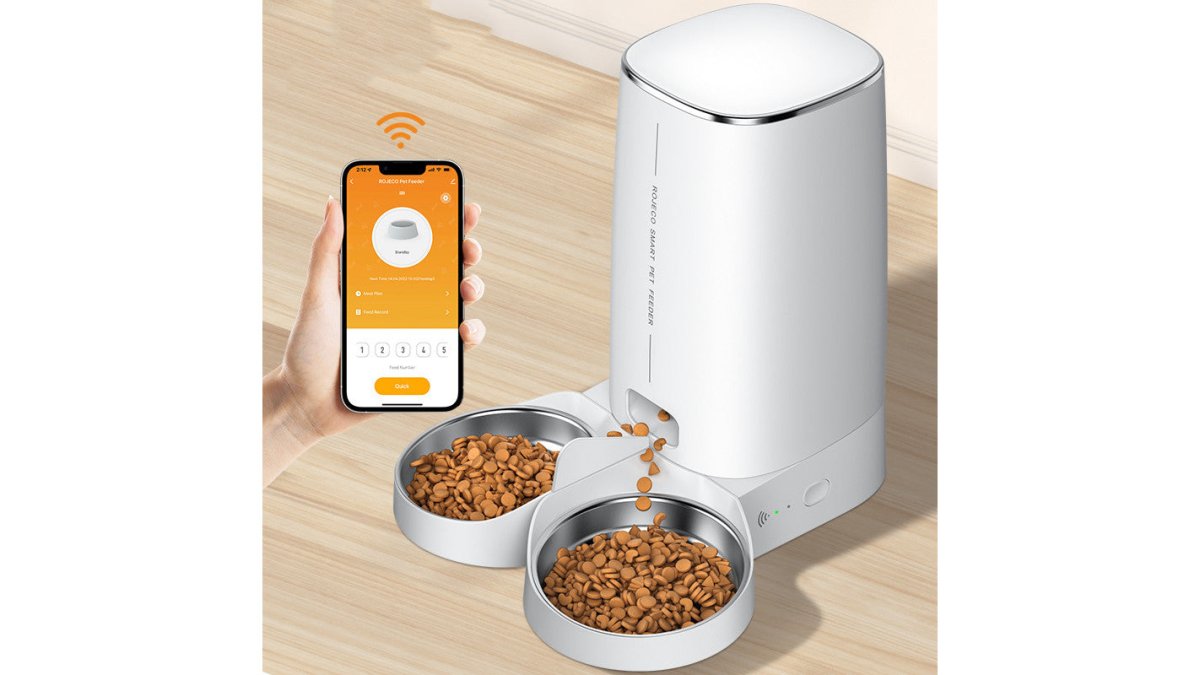
If feeding times keep slipping on busy days, a scheduled feeder removes that task from your list entirely. The Smart 4L WiFi Automatic Pet Feeder - Dual Bowl holds 4 litres, runs on WiFi app control or a simple button mode, and includes a low food reminder, so pet care stops depending on memory.

Time Blocking for Daily Tasks: A Practical Workflow
Time blocking means giving each task a real slot on your calendar instead of hoping it fits into the gaps.
Smart 4L WiFi Automatic Pet Feeder – Dual Bowl →
The Three-Point Daily Workflow
A repeatable day has three short planning moments, none longer than ten minutes:
- Morning plan (5–10 minutes): Review your calendar, pick three priorities, and block them before opening email.
- Mid-day review (2–3 minutes): Compare planned versus completed. Move one block if you are behind.
-
End-of-day reset (5 minutes): Capture unfinished items into tomorrow’s list and clear your desk.
Estimate Task Duration Before You Block It
Add 25–50% buffer to your first estimate. A task you think takes 20 minutes usually takes 30.
Sample Schedules for Different Work Styles
Use these as starting templates, not rigid rules. Adjust the block lengths to match your energy and meeting load.
|
Work style |
Morning |
Mid-day |
Afternoon |
|---|---|---|---|
|
Deep-focus knowledge work |
90-minute focus block on top priority, notifications off |
15-minute inbox and message sweep |
60-minute collaboration block, then 30-minute admin block |
|
Meeting-heavy role |
30-minute plan and prep before first meeting |
10-minute review between meetings |
45-minute catch-up block for follow-ups and notes |
|
Home or caregiving |
20-minute reset and priority pick after school drop-off |
10-minute check while tasks run |
30-minute household block, then tomorrow's prep |
Handling Interruptions and Unexpected Tasks
Leave one open block of 30 to 60 minutes each day. When something unexpected arrives, write it in that block instead of reshuffling the whole day.
Protect your first focus block like a meeting. One uninterrupted 90-minute block usually produces more completed work than three fragmented hours.
Best Apps for Organizing Tasks (and When Paper Wins)
Pick the tool you will actually open daily.
|
Approach |
Best for |
Strengths |
Trade-offs |
|---|---|---|---|
|
Paper planner |
Under 10 tasks a day |
Fast, no notifications |
No sync, easy to lose |
|
Calendar-first |
Fixed deadlines |
Shows real capacity |
Weak for flexible tasks |
|
Task app |
10–25 tasks a day |
Reminders, searchable |
Setup time |
|
Hybrid |
Mixed personal and work |
Flexible capture + reliable scheduling |
Requires daily transfer |
A system is working if it reduces decisions, not if it looks impressive. Track overdue tasks, planned versus completed, and time spent planning for two weeks. If two of three worsen, change one thing at a time.
Build Your Own Daily Routine With Noodolab
The routine that sticks has the fewest moving parts: capture, decide, schedule, review. Start with three priorities a day and one open block for interruptions.
To remove repeating chores from your list entirely, consider these practical tools:
- Smart 4L WiFi Automatic Pet Feeder – Dual Bowl — Set feeding times once. The app handles the rest.
- 4-in-1 Electric Handheld Food Chopper — Prep vegetables, garlic, and meat in seconds.
- Foldable Hanging Kitchen Trash Can — Keep the kitchen clean without sacrificing space.
-
Foldable Anti-Mold Cutting Board – 2 Pack — Easy to clean and store flat.

Small tools that remove daily chores from your list.
Shop Kitchen & Home Essentials →
Frequently Asked Questions
What is the easiest way to organize daily tasks?
Pick one place to write everything down, then sort each item into a fixed deadline or a flexible task. Choose three priorities for the day and block time for them. The system works because it is short enough to repeat every morning.
How many tasks should I put on my daily to-do list?
Most people do well with three to five priority tasks plus a short list of smaller errands. Anything beyond that becomes a wish list. If a task keeps rolling over for a week, break it into smaller steps or drop it.
Is it better to plan tasks the night before or in the morning?
Planning the night before saves decision time in the morning. A short morning review still helps because plans change. Try five minutes the night before, then two minutes after breakfast.
How can I stay organized when my plans change?
Leave buffer time in your schedule, ideally 20 to 30 minutes between blocks. When something urgent arrives, move a flexible task rather than cancelling it. At the end of the day, compare planned versus completed tasks.
